Créer un compte cagnotteur et sa cagnotte
Découvrez comment créer compte cagnotteur avec sa cagnotte La Cagnotte des Proches (LCDP).
Avant de commencer
Procurez-vous un jeu de clé API via La Cagnotte des Proches. Voir Authentification
L'application ci-dessous est composé d'un frontend (javascript) et d'un backend (php).
Pour intégrer et tester cet exemple en localhost, vous avez besoin :
de votre
publishable key: à coller dans le fichier client.html, remplacer__PUBLISHABLE_KEY__par votre clé.de votre
secret key: à coller dans le fichier myapi.php, rempalcer__SECRET_KEY__par votre secret.un serveur php sur votre ordinateur (en localhost pour tester rapidement)
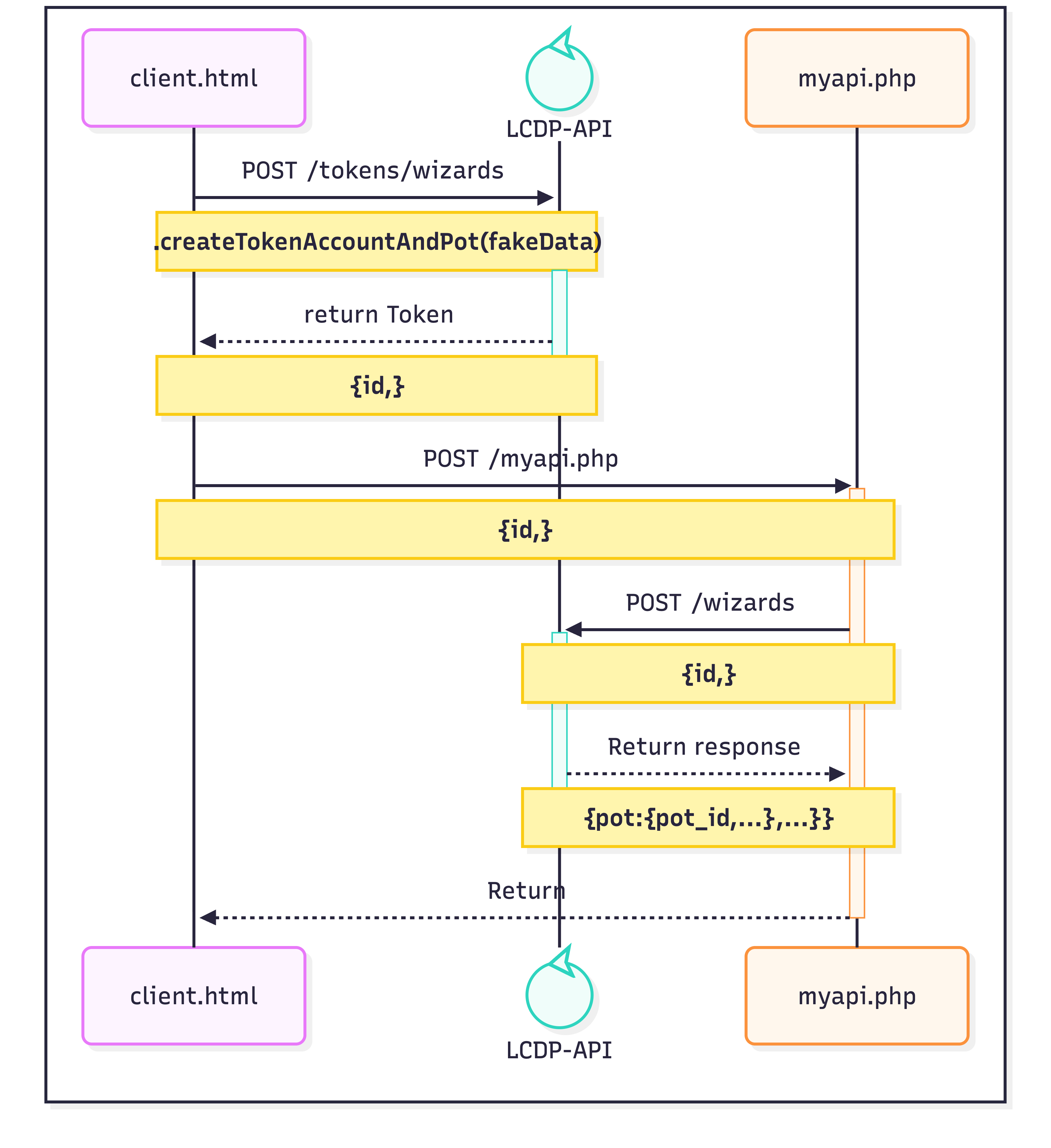
1. Fichier client.html
<html>
  <head>
    <meta charset="UTF-8" />
    <title>client</title>
    <script
      src="https://cdn.jsdelivr.net/npm/@lacagnottedesproches/lcdp-js-lite@1.9.0/dist/index.umd.min.js"
      async
    ></script>
  </head>

  <body>
    <button id="btn-create-account-pot">
      Créer dynamiquement un compte/cagnotte
    </button>

    <script>
      // Wait until the SDK is loaded (because of "async")
      window.addEventListener("load", function () {
        if (!window.lcdpjs) {
          console.error("LCDP SDK not loaded");
          return;
        }

        // 1 - PASTE your publishable key
        const PUBLISHABLE_KEY = "__PUBLISHABLE_KEY__";

        // 2 - Load lcdpjs
        window.lcdpjs
          .loadLCDP(PUBLISHABLE_KEY, {
            // ou https://api.lacagnottedesproches.fr pour la production
            api_url: "https://dev-api.lacagnottedesproches.fr",
          })
          .then(async (lcdpInstance) => {
            // 3 - Get a Category ID
            // To create an account with a money pot, we need a category and its id.
            const availableCategories = await lcdpInstance.getCategories();
            const firstCategory = availableCategories[0] ?? false;
            if (!firstCategory) {
              // we should never goes here as LCDP will always provide categories.
              return;
            }

            const btn = document.getElementById("btn-create-account-pot");
            if (!btn) {
              return;
            }
            btn.addEventListener("click", async () => {
              // 4 - Generate fake data
              const fakeData = {
                email: `john.doe+${Math.round(new Date().getTime() / 1000)}@gmail.com`,
                password: "MyFakePasswordvAePyMYd7&hwe#9uQM",
                first_name: "John",
                last_name: "Doe",
                birth_date: new Date(1986, 10, 12),
                address: "2 rue Eugene Spuller",
                postcode: "75003",
                city: "Paris",
                phone_number: "+330650515257",
                country_code: "fr",
                name: `Cagnotte ${new Date().getTime()}`,
                category_id: firstCategory.id,
              };
              console.log("my fake data", fakeData);

              // 5 - We retrieve a Token from LCDP API
              const token =
                await lcdpInstance.createTokenAccountAndPot(fakeData);
              console.log("token", token);

              // 6 - We send the Token ID to the backend server (our php)
              try {
                const response = await fetch(
                  "http://localhost:1235/myapi.php",
                  {
                    method: "POST",
                    headers: {
                      "Content-Type": "application/json",
                    },
                    body: JSON.stringify(token),
                  },
                );

                const data = await response.json();
                if (data && data.pot && data.pot.pot_id) {
                  alert("Compte Cagnotte créé avec succès !");
                }
              } catch (error) {
                console.error(error);
              }
            });

            // This will display your money pots.
            const myMoneyPots = await lcdpInstance.getPots();
            console.log(myMoneyPots);
          })
          .catch((error) => {
            console.error(error);
          });
      });
    </script>
  </body>
</html>
2 - Fichier myapi.php
<?php
// myapi.php

// Only allow POST requests
if ($_SERVER['REQUEST_METHOD'] !== 'POST') {
    http_response_code(405); // Method Not Allowed
    echo json_encode(['error' => 'Method not allowed']);
    exit;
}

// Get JSON body from request
$input = file_get_contents('php://input');
$data = json_decode($input, true);

if (!$data) {
    http_response_code(400);
    echo json_encode(['error' => 'Invalid JSON']);
    exit;
}

// Prepare data to send to external API
$payload = json_encode([
    'id' => $data['id'] ?? 'string',
    'type' => $data['type'] ?? 'wizard',
    'client_ip' => $_SERVER['REMOTE_ADDR'] ?? '127.0.0.1',
]);

// cURL request to external API
$ch = curl_init('https://dev-api.lacagnottedesproches.fr/wizards');
curl_setopt($ch, CURLOPT_RETURNTRANSFER, true);
curl_setopt($ch, CURLOPT_POST, true);
curl_setopt($ch, CURLOPT_HTTPHEADER, [
    'Content-Type: application/json',
    'User-Agent: lcdp/v1',
    'Authorization: Bearer __SECRET_KEY__'
]);
curl_setopt($ch, CURLOPT_POSTFIELDS, $payload);

// Execute the request
$response = curl_exec($ch);
$httpCode = curl_getinfo($ch, CURLINFO_HTTP_CODE);
$curlError = curl_error($ch);

// Determine response
header('Content-Type: application/json');

// Check if the request was successful
if ($curlError) {
    http_response_code(400);
    echo json_encode(['error' => 'cURL Error: ' . $curlError]);
} elseif ($httpCode >= 200 && $httpCode < 300) {
    http_response_code(200);
    echo $response;
} else {
    http_response_code(400);
    echo json_encode(['error' => 'External API returned ' . $httpCode, 'response' => $response]);
}
?>